Project Assignments Page Overview
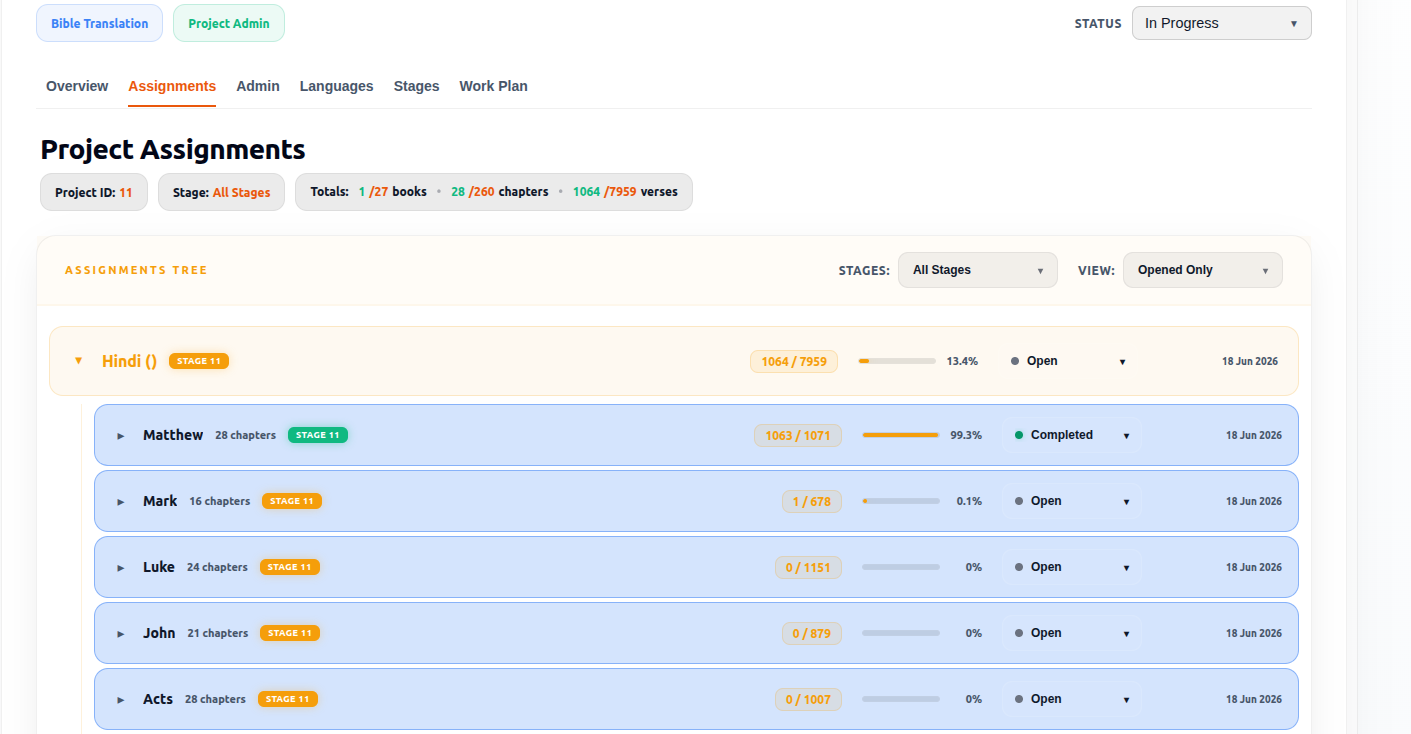
The Project Assignments Page is the operational workflow management area used to organize and track Bible translation progress across languages, books, chapters, and verses.
This page provides a hierarchical assignment structure that helps project teams monitor scripture translation work in a highly organized and measurable way.
It allows users to:
- Track translation progress
- Monitor workflow stages
- View scripture completion percentages
- Navigate assignments easily
- Supervise active translation work
- Manage verse-level workflow operations
- Monitor assignment ownership and responsibilities
Access Permissions
| Role | Access |
|---|---|
| Admin | ✓ |
| Officer | ✓ |
| PM | ✓ |
| TL | ✓ |
| Team Member | ✓ |
Prerequisite
Before assignments become available, at least one language must be configured for the project.
Assignments are organized under project languages and their associated workflow stages.
Purpose of the Page
The page is designed to break Bible translation into structured assignment units so teams can monitor work at multiple levels:
Language → Book → Chapter → Verse Progress
This makes large scripture translation projects manageable, measurable, and trackable.
Role Structure & Permission Levels
The Project Assignments page supports multiple project roles with different levels of operational permissions.
These roles help maintain workflow hierarchy, accountability, and controlled access.
PA (Project Admin)
Permission Level
Highest operational authority inside the project assignments workflow.
Responsibilities
- Full assignment management
- Workflow supervision
- User assignment control
- Stage management
- Permission oversight
- Monitoring project-wide progress
- Administrative workflow configuration
PMO / PM (Project Management Officer / Project Manager)
Permission Level
Project operational management role.
The PMO and Project Manager roles function as the same operational role.
Responsibilities
- Manage translation workflows
- Assign users and tasks
- Monitor progress
- Supervise workflow stages
- Track project completion
- Coordinate translators and reviewers
- Manage assignment distribution
TL (Team Leader)
Permission Level
Workflow supervision role.
Responsibilities
- Supervise translation progress
- Monitor assigned work
- Support translators and reviewers
- Track verse completion
- Monitor workflow stages
Limitations
- Cannot manage full administrative permissions
- Cannot configure major project-level settings
- Cannot assign project-level permissions
TM (Team Member)
Permission Level
Basic operational contributor role.
Responsibilities
- Work on assigned translation tasks
- Update verse progress
- Participate in workflow stages
- Complete assigned scripture work
Limitations
- Cannot manage users
- Cannot assign tasks
- Cannot change workflow configurations
- Cannot modify project administration settings
Project Assignments Summary Bar
At the top of the page is the project summary section.
This provides high-level project statistics and workflow visibility.
Project ID
Example:
Project ID: XYZ
Purpose
- Internal system identifier
- Used for database tracking
- Used for project references
- Helps identify assignments linked to the project
Stage Indicator
Example:
Stage: All Stages
Purpose
Shows which workflow stages are currently being displayed.
Possible stage filters may include:
- Drafting
- Review
- Checking
- Approved
- Final
This helps users focus on specific workflow phases.
Assignments Tree
The Assignments Tree is the core operational structure of the page.
It organizes assignments hierarchically:
Language → Book → Chapter → Verse
This structure helps users:
- Expand/collapse sections
- Navigate large scripture projects
- Monitor progress in detail
- Track assignment ownership
- Supervise workflow movement
Assignment Tree Status Dropdown
The Status Dropdown is used to filter or manage assignments by operational status.
Possible statuses may include:
- Open
- In Progress
- Completed
Purpose
Helps users:
- Filter assignments quickly
- Monitor active work
- Identify pending tasks
- Review completed assignments
- Track workflow activity efficiently
This improves workflow visibility across large translation projects.
Assignment Tree View Dropdown
The View Dropdown controls how assignment data is displayed inside the Assignment Tree.
Possible view options may include:
- Language View
- Book View
- Chapter View
- Verse View
- Workflow View
Purpose
Allows users to:
- Customize assignment visibility
- Switch between detailed and summarized views
- Navigate large projects more efficiently
- Focus on specific workflow structures
- Improve operational monitoring
This helps teams manage scripture translation work more effectively.
Language-Level Section
At the top level of the tree is the translation language.
Example:
Malayalam (MAL)
This represents the active translation language being tracked.
Workflow Stage Badge
Example:
DRAFTING
Purpose
Displays the current workflow stage for the language.
This indicates where the language currently sits in the translation process.
Language Verse Progress
Example:
14 / 6416
Purpose
Tracks:
- Completed verses
- Total verses for the language
Provides high-level scripture completion monitoring.
Progress Bar
Visual representation of completion progress.
Purpose
Helps users quickly identify:
- Active work
- Progress levels
- Delays
- Incomplete sections
Percentage Indicator
Example:
0.2%
Purpose
Displays exact completion percentage for the language.
Verse Workflow Stage Badge
Example:
DRAFTING
What It Does
Shows the workflow stage currently assigned to that verse.
This allows different verses to move through different workflow stages independently.
Verse Status Indicator
Example:
In Progress
What It Does
Shows the operational state of the verse assignment.
Possible statuses may include:
- Open
- In Progress
- Completed
- Reviewed
- Approved
Action Dropdown
The small dropdown arrow beside each verse allows users to access additional actions or workflow controls for that verse assignment.
Potential Actions
May include:
- Change status
- Assign users
- Move workflow stage
- Open verse details
- View assignment activity
- Monitor workflow history
Last Updated Date
Example:
Apr 30, 2026
What It Does
Displays the latest activity or update date for the verse assignment.
Used for:
- Activity monitoring
- Accountability
- Workflow tracking
- Identifying inactive assignments
Why Verse-Level Tracking Is Important
Bible translation projects require extremely detailed progress management.
Verse-level tracking allows teams to:
- Monitor precise translation progress
- Track workflow stage per verse
- Identify incomplete sections quickly
- Coordinate translators and reviewers efficiently
- Maintain structured scripture workflows
- Improve operational accountability
- Track workflow ownership clearly
This creates highly organised and measurable translation management inside Arkbox.
Role-Based Feature Summary
| Feature | Admin | Officer | PM | TL | Team Member |
|---|---|---|---|---|---|
| View Assignments | ✓ | ✓ | ✓ | ✓ | ✓ |
| Change Stage Status | ✗* | ✗* | ✓ | ✓ | ✗ |
| Reopen Closed Stage | ✓ | ✓ | ✗ | ✗ | ✗ |
| Change Book Status | ✗ | ✗ | ✓ | ✓ | ✓ |
| Change Chapter Status | ✗ | ✗ | ✓ | ✓ | ✓ |
| Change Verse Status | ✗ | ✗ | ✓ | ✓ | ✓ |
| Reopen Closed Book | ✗ | ✗ | ✓ | ✓ | ✗ |
| Reopen Closed Chapter | ✗ | ✗ | ✓ | ✓ | ✗ |
| Reopen Closed Verse | ✗ | ✗ | ✓ | ✓ | ✗ |
| Multi-Select Mode | ✗ | ✗ | ✓ | ✓ | ✓ |
* Admins and Officers cannot participate in normal stage status progression but can reopen a closed stage.
Notes
- Assignments are available only after project languages have been configured.
- Assignment information is displayed in a hierarchical tree structure.
- Stage status management is restricted to PM and TL roles.
- Closed stages can only be reopened by Admins and Officers.
- Team Members cannot modify stage-level status.
- Multi-select functionality is available only to PM, TL, and Team Member roles.
- Bulk status updates are available through Multi-Select mode where permitted.