Project Administration Page Overview
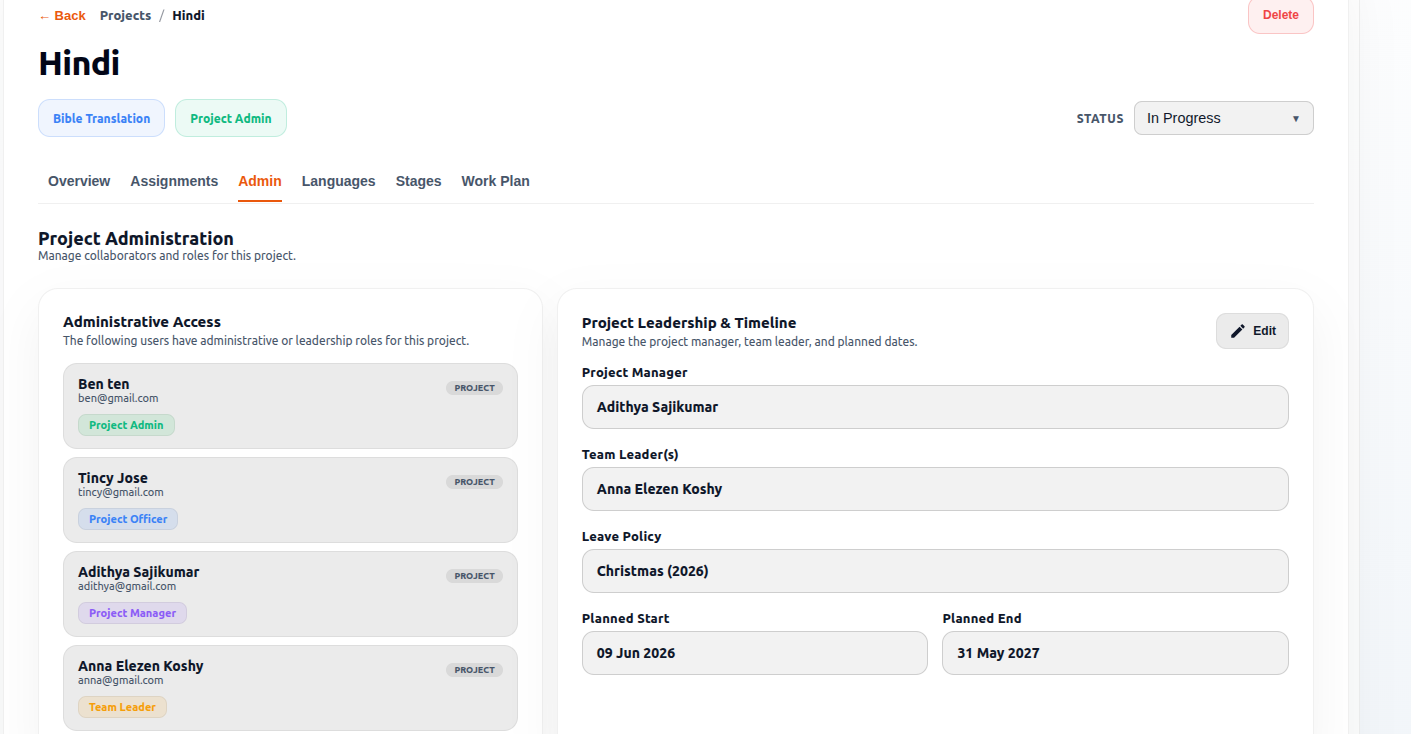
The Project Administration page is used to manage the people, leadership structure, administrative roles, and project timelines assigned to a project. This section controls who has authority inside the project and who is responsible for managing workflows, timelines, and translation activities.
This page is especially important in Bible Translation projects because it separates:
- Administrative management
- Operational leadership
- Translation coordination
into clearly defined responsibilities.
Purpose of the Page
The Project Administration page helps administrators:
- Manage project collaborators
- Assign leadership roles
- Change project managers
- Configure team leadership
- Maintain accountability structures
- Control project-level administration
- Change the Project Start Date
- Change the Project End Date
This ensures every project has clearly assigned responsibilities and governance.
Access Permissions
| Role | Access |
|---|---|
| Admin | ✓ |
| Officer | ✓ |
| PM | ✓ |
| TL | ✓ |
| Team Member | ✗ |
Page Structure
The page is divided into two main sections:
| Section | Purpose |
|---|---|
| Administrative Access | Displays current project collaborators and roles |
| Project Leadership & Timeline | Used to manage project leadership assignments and project timeline configuration |
Administrative Access Section
The left panel displays all users who currently have administrative or leadership access inside the project.
This acts as the project’s leadership directory.
User Cards
Each card represents a project collaborator with elevated permissions.
Each user card displays:
- Name
- Email address
- Role badge
- Project-level access indicator
Project Admin Role
Purpose
The highest project-level authority inside the project.
Responsibilities
Typically responsible for:
- Managing project configuration
- Assigning users
- Controlling permissions
- Supervising workflows
- Administrative oversight
- Managing project timelines
- Updating project Start and End dates
This role usually has the broadest project permissions.
Project Manager / Project Management Officer (PMO) Role
Purpose
Responsible for overall project coordination and accountability.
The Project Manager and Project Management Officer (PMO) roles are considered the same role inside the system and share the same responsibilities.
Responsibilities
Includes:
- Timeline supervision
- Team coordination
- Progress monitoring
- Workflow oversight
- Project delivery management
- Managing translation workflows
- Assigning team members to the project
- Updating project configurations based on permissions
This role focuses on overall project execution and operational management.
Team Leader Role
Purpose
Operational leadership role specific to workflow execution.
Responsibilities
Typically responsible for:
- Translation coordination
- Daily workflow supervision
- Supporting translators and reviewers
- Monitoring scripture progress
- Managing operational workflows
The Team Leader role functions similarly to the Project Manager role in workflow management.
Key Difference
- The Project Manager can assign team members to the project.
- The Team Leader cannot assign team members.
This role is especially useful in Bible Translation projects.
Project Leadership & Timeline Section
The right panel is used to configure project leadership assignments and project timelines.
This section allows administrators to manage who leads the project operationally and control project-level configurations.
Project Manager
The Project Manager field displays the user assigned to manage the project.
This field identifies the primary person responsible for project coordination and delivery.
Team Leader(s)
The Team Leader(s) field displays the user or users assigned as Team Leaders for the project.
Team Leaders are responsible for coordinating assigned project activities and supporting project execution.
Leave Policy
The Leave Policy field displays the leave calendar associated with the project.
This information is used when planning project schedules and timelines.
Planned Start Date
The Planned Start Date field displays the scheduled start date for the project.
This date represents the planned beginning of project activities.
Planned End Date
The Planned End Date field displays the scheduled completion date for the project.
This date represents the planned end of project activities.
Configuration Permissions from the Admin Panel
Depending on their permission level, the following roles can configure and manage project settings from the Admin Panel:
- Admin
- Project Admin
- PMO / Project Manager
- Team Leader
These roles may have permission to manage:
- Project leadership assignments
- Team member assignments
- Administrative access
- Workflow-related settings
- Project timelines
- Project Start Date
- Project End Date
Available permissions depend on the assigned role and access level.
Project Manager Dropdown
Displays the currently assigned Project Manager.
Example:
Name(User.id)
Dropdown Selector
Purpose
Allows administrators to:
- Change the Project Manager
- Reassign project leadership
- Select another eligible user
Search Manager Field
Purpose
Used to quickly search for users inside the organization.
Helpful when many users exist in the system.
User Selection List
Displays available users who can be assigned as Project Manager.
Example entries:
- ABCD
- Test
- XYZ
- test user
Purpose
Allows administrators to select a new project leader from the available users.
Save Changes Button
Purpose
Applies and stores the updated project leadership configuration.
Used after:
- Selecting a new manager
- Modifying leadership assignments
- Updating project timeline settings
Cancel Button
Purpose
Closes or resets changes without saving modifications.
Edit Functionality
An Edit button is available within the Project Leadership & Timeline section.
The availability of editing actions depends on the user's assigned role.
Project Manager Permissions
Project Managers can modify:
- Team Leader(s)
Project Managers cannot modify:
- Project Manager assignment
- Leave Policy
- Planned Start Date
- Planned End Date
Team Leader Permissions
For Team Leaders, the Edit button is not displayed.
Team Leaders have view-only access to the information shown on this page.
Role-Based Visibility Summary
| Section | Admin | Officer | PM | TL |
|---|---|---|---|---|
| Administrative Access | ✓ | ✓ | ✓ | ✓ |
| Project Leadership & Timeline | ✓ | ✓ | ✓ | ✓ |
| Edit Button | ✓ | ✓ | ✓ | ✗ |
* Project Managers can edit Team Leader assignments but cannot modify the Project Manager assignment, Leave Policy, or project dates.
Why This Page Is Important
This page establishes:
- Leadership accountability
- Permission hierarchy
- Workflow authority
- Administrative structure
- Timeline management
Without proper role management:
- Workflow coordination becomes unclear
- Permissions may become inconsistent
- Project accountability is weakened
- Project timelines may become difficult to manage
This page ensures structured project governance inside Arkbox.